Archive for April, 2008

Is Mac the Anti-Linux or the Answer?

So, I’ve been toying with the idea of buying a mac. Using WindowsXP is a no go for me, we’re just not friends; work haven’t yet rolled out Vista. I love linux, have been using it for years, and have upset many an I.T department by partitioning their loving-crafted standard Windows Build with my favourite flavour of linux but I’m getting the same old Gripes….

Hardware-Compatibility: Now don’t get me wrong, fedora has installed and pretty-much worked out of the box for years, but it’s the little niggles that get you, my hp nc6320 (company issued) has an intel wireless card, and quite frankly the fedora support is unreliable; if it’s not issues where by I can’t connect to hidden ssids, I can’t run leap, and even my broadcasted home wpa network can be a bit flakey (my n800 & ps3 use it fine so it’s definitely a laptop issue)…. top this off with the odd issue with graphics cards, very little support for mobile broadband, fingerpint authentication and it’s enough to drive anyone mad!

Work-Compatibility: Like most UK companies EVERYTHING has a windows focus, even down to the linux web-managed-appliances which have to be ie7 compatible. Open-office is great, but I can’t run the macro’s written by our marketing department (which format things) and even if I do manually make it look right the conversion to MS-Word is a bit “iffy”. Evolutions exchange-connector works most of the time, but archiving my mailbox from outlook screws it, changing my password (due to expiry) cause mail-notification to freak-out, and the built-in html formatting engine doesn’t set a font so if I reply to an HTML e-mail, all my text is in the nasty times roman.. and just another couple of points since I’m in full rant, share-point support in firefox! and what is everyone’s obsession is MSN and office communicator, what’s wrong with skype or google talk both of which have platform independent solutions. (Yes pidgin supports MSN, but it’s not feature complete)

So is a mac the answer? Those I’ve known an met whom own macs (and in the UK, unless you’re in media they’re few and far between) have all said “everything just works”… oh how I’ve longed for that… and the UI is nice, so all the compiz prettyness that I’ve gotten used to is kinda there. I’ve done some research, there’s an offical office for mac, which support exchange, there’s a communicator for LCS which includes msn support, there’s certianly more off the shelf software that supports mac than linux!

But is it out of the frying pan into the fire? Let’s look at why XP doesn’t work for me, 1stly the interface, it makes me feel unconfortable, I’ve tried themeing it, but that just covers up the bad colour scheme, themes ocasionally slow your machine down, some apps don’t accept the theme engine, and after-all you’re just painting a bad egg so even if it is easier on the eye the problems sill exist! All this aside, Vista is supposed to address the usability and eye-candy issues, so maybe I should be using that? So user-interfaces could be considered a shallow reason to choose your OS, and to be honest although how I interact with the PC is important (since it’s what I do for a living) it’s not what attracted me to linux in the 1st place. FREE, yes FREE is what attracts most of us to linux, windows licencing and cost is a nightmare, winzip & winrar are examples of stuff you expect to have as part of the OS, yes XP can open .zips but what about .tgz? … OK lets look at terminal emulation or ssh, finding a good one can be a problem putty is great but it’s a bit dis-jointed, the sftp function isn’t built into explorer tab’s is an extra add-on… what about the stuff you occasionaly use, so I re-size the odd image or convert .jpg to .png should I be paying for a tool I only use once a month, if I should, can I afford it?

The investment in a mac is not a small one, so my question is, can I get the best of both worlds? Can I buy the software I need, and download open-source alternative easily for the rest? Can I mix the “it just works” with the tech-tinkering that I’m used to? After purchasing a macbook, ms office for mac, vmware-fusion (I have vm-ware server on linux to run visio, I know this will be no-different on a mac) and topped that off with a backup-solution (work pay to backup windows, rsync does the job for linux) I’m going to have spent best part of £1,500… oh yeah this includes a special VGA cable so I can plug into a projector… apple are known for tying users in tightly, will that become my new bug-bear? which leads me to….

Is Mac the Anti-Linux?
Apple insist that their OS runs only on their hardware, the ipod only works with their software (itunes) and plays their music format, you need special cables to plug your laptop into a standard monitor/projector, the iphone only works with apples chosen provider… is all this restriction going to make things worse? Linux is about freedom, machine architectures range from pda’s to playstations, the interface that you use can easily be changed, nearly everything is open and if I were a programmer I could fix, change, anything I liked…. would I be jumping from complete democratic freedom to a dictatorship?

So there we have it, a million questions I just don’t know the answer to! I do know I don’t have a grand kicking about, so this won’t be something I tackle lightly, if I do I then have the politics at work to address, no booting into linux isn’t supported by IT, but the laptop is a standard-same-as-everyone-else-thingy if I bring in a shiny new apple it’s going to attract attention…. which will certainly upset someone! The windows of change are bring more macs to the UK, but is it just a fad? More thought is definitely needed, I just hope I can bring myself to a decision soon :)

UGHRRG, ie6!!!! Should I support it?

I’m in the process the process of writing a whole new look for linickx.com, I think I’m about there so I’ve decided it was about time to give the other browsers a spin. All of my development has been with Firefox on linux (with a little epiphany for testing non logged in users) and I’ve got the look and feel pretty much as I like.

I reboot into windows cause according to google analytics 70% of my visitors in the last month are windows people; Firefox on windows passes the test, all the same, so I’ve downloaded a copy of safari for windows, good news there too and I finish off with Internet Explorer 6, crap I forgot that ie6 cannot render transparent .png files, although the layout is alright my new header is screwed and I’ve used .png icons in my /files/ section so that’s going to look rubbish.

This leaves me with a dilemma, do I re-do all of my images as .gifs to account for the 10% of ie6 users? And is it possible to dual install ie6 & ie7 ? … I still haven’t tested that and 20% of visitors use that…I’ve never bothered upgrading to ie7 since I new I was never going to use it, why waste the disk space & bandwidth?

I’m toying with having a browse happy banner appear for ie6 and a disclaimer saying this site will look awful use a proper browser; the banner will be easy to do within the WordPress powered section, but the /files/ section which is driven by apache may be more of an issue.

The whole thing is just irritating, I was really looking forward to getting the new look up soon, ho-hum off to make a decision!

P.s. In case you were wondering, yes 60% of vistors are firefox, 5% are safari and the other 5% is made up of random stuff (hello to the 2 users on the PSP!!!)

History Meme – What’s your shell top 10?

Planet gnome have started a trend

$ history | awk '{a[$2]++}END{for(i in a){print a[i] " " i}}' | sort -rn | head
114 ping
107 sudo
82 ssh
71 top
71 cd
68 iwconfig
56 ls
46 usbkey.sh
43 ps
33 evolution

The output shows what commands you type the most, usbkey.sh is a script to unlock the secret-keys held on my usb key-fob, sudo is high up probably cause I use sudo to bounce services (the intel wireless drive crashes quite alot and both it and Network Manager then need restarting) and evolution needs a shutdown every now and again :( The other commands are fairly self-explanatory.

So what’s your history?

Have you seen www.ps3iplayer.c…

Have you seen www.ps3iplayer.com ?

k2 for bbPress – Updated v0.02

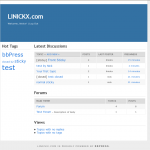
K2 in Action on bbPress

It’s been a while since I’ve used bbPress, but a major milestone from the automattic guys has pretty much broken the theme.

I’ve done a complete re-write; as before I’m only distributing the style.css (and a screenshot) no template.php files, this ensure that no security issues are associated with my theme.

Download k2 for bbPress

Installation

  • Create a “my-templates” directory in your bbPress installation directory
  • Download unzip k2 for bbpress in that directory
  • Under “design” and “themes” select k2
  • done :)

The screenshot has been updated, existing users may find things move a little, this is due to the changes in bbPress, but hopfully it’s all for the better.

md5 of k2_for_bbPres_v0.02.zip: c87eb943165a5d909dced2860021107f

Recent phpBB Topics on Wordpress Plugin v0.4

UPDATE: This Plugin has been updated, please download the update from http://wordpress.org/extend/plugins/phpbb-recent-topics/, and please comment on the new post, thanks.

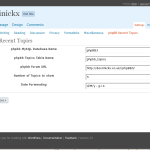
phpBB Recent Topics Admin interface in Wordpress
Admin GUI

It’s been a year since the last release so perhaps this version should be called “about time!” v0.4 has primarily been released as a bugfix version, if you’re happy with v0.3 and have it running fine then don’t bother, in fact edit phpbb_recent_topics.php so that WordPress stops complaining about finding a newer version.

Download phpBB_Recent_Topics_0.4 from wordpress.org

What’s New?

  • Most importantly I have tested this plugin with phpBB3 and WP2.5 so I’ve updated the readme.txt to reflect this.
  • I finally quashed the install bug where by phpbb-recent-topics was confused with phpbb_recent_topics.
  • Sidebar Widget, yus for all you non-php people you have a widget to play with.
  • Edit the Time & Date layout – leave blank to remove it completely

What’s Old? – aka: Installation

  • Unzip phpbb_recent_topics.tgz in your `/wp-content/plugins/` directory. (You’ll have a new directory, with this plugin in /wp-content/plugins/phpbb_recent_topics)
  • Activate the plugin through the ‘Plugins’ menu in WordPress
  • Configure the plugin, you need to tell wordpress about phpbb, this is done in the wordpress menu ‘Settings’ -> ‘phpBB Recent Topics’
    The following Settings are required:

    • * The name of your phpBB database (e.g phpbb)
    • * The name of the table where topics are held (the default is phpbb_topics )
    • * The full url of your forum for links (e.g. http://www.mydomain.com/forum)
    • * The number of topics to show. (If left blank you get 5)
    • * The Date Formatting, i.e. “d/M/y – g:i a” similar to the WordPress “General Settings”
  • Hit ‘Update Options”
  • To output the list of topics in a page or post…
    • * create a new page/post, type {phpbb_recent_topics} , hit ‘Publish’ or ‘Create new page’

    To output the list of topics in your theme sidebar using the widget…

    • * click “design” in the dashboard
    • * click “widgets”
    • * next to phpBB Recent Topics click “add”
    • * click “save changes”

    To output the list of topics in your theme sidebar using a template tag…

    • * edit sidebar.php and inside <div id=”sidebar”> type…
      <?php
      if (function_exists('phpbb_topics')) {
      phpbb_topics();
      }
      ?>

A bit about Database configuration.
If wordpress & phpBB share a DB already then set $PHPBBDB to DB_NAME and everything will be fine, else you’re going to need to GRANT the wordpress user read access to phpBB.

How to GRANT wordpress read only access to phpBB ?
If you don’t know it already you need to find your wordpress mysql user id, it’ll be in wp-config.php

define('DB_USER', 'wp_user');     // Your MySQL username

and you should have already found your phpbb database & table for the above.
You need to type the following syntax into your mysql database

GRANT SELECT ON phpbb_database.phpbb_topics TO wp_user@localhost;

this can be achieved by logging into phpmyadmin as your phpbb user, selecting SQL and pasting the correct GRANT into the text box.

Frequently Asked Questions

  • Is phpbb3 supported?
    • yes.
  • Can I output 10 Topics in my Page, and 3 Topics in my Sidebar ?
    • Yes ! In the Wordpress menu ‘Options’ -> ‘phpBB Recent Topics’, set ‘The number of topics to show’ to 10, and then in your sidebar include…<?php
      if (function_exists(‘phpbb_topics’)) {
      phpbb_topics(3);
      }
      ?>
  • Can I exclude a certain forum from the list ?
    • In this version, the only way to do that is to hack /wp-content/plugins/phpbb_recent_topics/display/display.php, change
      $results = $wpdb->get_results("SELECT * FROM $TOPIC_TABLE ORDER BY topic_time DESC LIMIT $LIMIT");

      to

      $results = $wpdb->get_results("SELECT * FROM $TOPIC_TABLE WHERE forum_id != 1 ORDER BY topic_time DESC LIMIT $LIMIT");

      to exclude forum 1 from the list. I plan to setup a proper solution to this in the next version.

  • Why is the date config under settings not in the widget configuration?
    • The date settings effect both the template tag and the widget :)

Support
I’ve always been honest about support, there isn’t any. Basically I write this for my own needs and then publish it for you to use for free. You’re more than welcome to post comments here and if you tag wordpress forum posts with “phpbb-recent-topics” I’ll reply to you there, but we all have busy lives and I make no promises on how quickly I’ll reply to you.

EDIT: Found a link for posting in the correct phpbb-recent-topics forum

Finally Subversion
You also might be interested to know that I’ve been getting to grips with the wordpress plug-ins svn, so you can get work directly from here; and when wordpress.org re-crawls my readme the latest version will also be available on wordpress.org/extend/plugins/ :cool:

Call to undefined function: register_sidebar_widget

So WP2.5 is out, and I figured it was about time I squashed that load bug on phpbb_recent_topics, while I’m at it I figure I’ll wigetize it.

The problem is that the example on the automattic site doesn’t actually work! If you paste…

function widget_myuniquewidget($args) {
    extract($args);
?>
        <?php echo $before_widget; ?>
            <?php echo $before_title
                . 'My Unique Widget'
                . $after_title; ?>
            Hello, World!
        <?php echo $after_widget; ?>
<?php
}
register_sidebar_widget('My Unique Widget','widget_myuniquewidget');

Into a blank plugin you get this in your logs…

PHP Fatal error:  Call to undefined function:  register_sidebar_widget()

Now I’ve not been bothered to dig out the exact reason why yet, something to do with the sidebar loading, but you need to wrap the whole lot up in an init function, so try this instead…

function widget_init_myuniquewidget() {
	// Check for required functions
	if (!function_exists('register_sidebar_widget'))
		return;

	function widget_myuniquewidget($args) {
	    extract($args);
	?>
	        <?php echo $before_widget; ?>
	            <?php echo $before_title
	                . 'My Unique Widget'
	                . $after_title; ?>
	            Hello, World!
	        <?php echo $after_widget; ?>
	<?php
	}
}

// Delay plugin execution until sidebar is loaded
add_action('widgets_init', 'widget_init_myuniquewidget');

I just need to work out now, how to add wiget options to the wp-admin panel and the next verions of my plugin will be done :)

Dear WordPress User, YES there…

Dear WordPress User, YES there will be a plugin update for 2.5, YES I am very busy, YES I do love you and the community

4 Days Later and I’m still suf…

4 Days Later and I’m still suffering from loosing that hours sleep, my head feels like it’s full of fuzz!!!