Archive for January, 2006

Sage: a feed reader for Firefox

This is worth mentioning….

Sage: a feed reader for Firefox
Sage is a lightweight RSS and Atom feed reader extension for Mozilla Firefox.

Google reader is good, but it’s still got some usability issues, mainly that the default page/interface only gives a list of unread posts, where as sometimes you only want to see (or hide) a specific feed. Obviously the downside with sage is you need firefox, but who’s not using firefox ;)

Anti-Phishing Toolbars

Protect your savings from Phishing attacks.

Anti-Phishing toolbars are trendy at the moment, google and ebay are a couple of the big players.

I agree with tool bars for security, in fact, one of the best things about firefox is the fact that you can extend it so easily, the problem is they generally need a specific version or browser, ebay’s need internet explorer and googles only works on firefox 1.5+ - what about those on macs or people like me who still run firefox 1.0 ?

Thoughts on a revision blog ?

I’ve decided to take charge of my technical development, I’d like to progress my cisco knowledge. As a CCSP I’ve got two choices: CCIE Security or CCNP. Now the CCIE is the better one, but I’ve looked through the material, and although I’ve got 5yrs security experience, I’m not confident I know enough general networking (especially for the practical lab), so I’m finking I’ll do both :D

GNOME Art - Tango Beer


Tango Beer
Backgrounds - GNOME

It’s under different name, but it’s nice to see the art.gnome people like my simple beer wallpaper :D

Simple Desktop Wallpaper

I thought it was time to clean up my desktop, you know had the usual mess of temporary files & shotcuts ! So to complement my cleaner desktop I thought I’d make a new gnome wallpaper.

My first draft was very plain, but then I remember this bottle top lid, I think it’s just the right touch.

Simple Gnome Gnome Beer on a Simple Background

Hope you like them :D

Debug Packet command missing on PIX 7

I’ve been googling & searching through cisco release notes to find out what happened to the pix debug packet command after I upgraded from v6.3 to v7, you know it really shouldn’t have taken that long because the first answer on google groups found it :$

The message suggest using the capture command and points to the cisco documentation : http://www.cisco.com/univercd/cc/td/doc/product/multisec/asa_sw/v_70/cref_txt/c.htm#wp1910869.

The first thing that strikes me is that the command isn’t a real time view like the old debug, but it will offer you a file that you can open in ethereal - now that’s quite cool :cool:
To get started you need to knock up an access list to capture the traffic, something like:

Fedora Core 5 Screen Shots

News on digg shows that FC5 Test2 is out !!.

Now I don’t usually care about test releases - FC is unstable enough ;) - but what is cool is the screen shots with the new FC artwork & logo’s, tiz very nice :D

The release notes: http://fedora.redhat.com/docs/release-notes/fc5/test2-latest-en/ have loads of information if you need it, notice that the fedora website is now supporting the new logo as well :cool: - little things eh !

All About Mice .co.uk

I thought it was about time to announce my wifes new website - http://www.allaboutmice.co.uk

It’s her personal site dedicated to providing “pet” mice lovers information on how best to care for their furry friend. To be honest I have absolutely nothing to do with the content, but I have had loads a fun messing with the techie stuff ! :D

The site is powered by wordpress & phpbb. The wordpress theme is a hacked derivative of twilight and the phpbb theme is a purplised version of subsilver.

Feed is not a registered protocol - Firefox , gnome and Fedora Core

I’ve put up with this error message for some time now:

Feed: is not a registered protocol

I run a firefox on gnome on fedora core, installation on my laptop. No matter how much googleing I did, I could not work out which part of the puzzle was at fault.

Well, today I sussed it, if I visit feed:myfeed the feed opens in google reader :cool:

Stickman by Georgia Aged 3 years

missing_image_goes_here

Is it just me being a “Sad-Dad” or is this really cute ?

I don’t know why but when she did is (in the gimp, I might add) I was really taken, maybe it’s because I see him ninja kicking :cool:

A strange big warning when you upgrade pix 6.3 to 7

When it comes to cisco pix’s, I’m not a gui fan; the cisco command line is soo straight forward that I’ve never found the need for the PDM.

Anyway I came across a pix 6.3 with PDM installed that needed upgrading to v7, surprisingly this has to be done from the boot monitor, and after it was complete I was presented with this :

Calcylator - Now with added ebay !

What did you do this weekend ? - Me, I made my first ebay api call :) - kinda geeky, and kinda cool at the same time.

You may notice that the home page on calcylator now boasts the ebay compatible logo, that’s because the SELL page on calcylator has changed. We now have the option for Quicker Entry when adding listings to the application; this quicker entry is a demonstration of where we’re going, type in your ebay listing/item id, and we’ll retrieve the item description and start price.

Download Microsoft Post SP3 Hotfix 228512 (Outlook)

So finding the download of 228512 took me a little longer than this bloke, but that’s because there are 4 pages of google!!!

At least I found it in the end, let’s hope MS CRM is worth it :)

http://download.microsoft.com/download/5/8/d/58dc27f4-babd-44d7-8bcc-7171c521f5d6/228512.exe

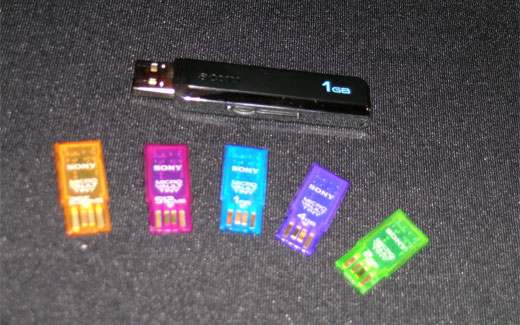
Teeny-Tiny Sony Microdrives.

From: Gizmodo UK : Live from CES: Sony Microdrives

744

Was reading the gizmondo blog yesterday, and I soo want one of these tiny drives, can u believe they recon they can get 5GB on something that small !!!!!!

Testing my MS-SQL username and password

I forgot my sa password today for our Microsoft sql server :( - I knew roughly what it was, but needed to just keep trying until I hit the right answer… now it took me ages to find this wid google so I thought I’d share it….

On a sql box there is a command line client, so in DOS you can test you connection (i.e. username + password)

C:\Documents and Settings\>osql -U sa

Password:

Login failed for user ’sa’.

C:\Documents and Settings\>osql -U sa

Password:

1>

2>