Category Archives: Blog
Revision 479519: logout upgrade (better cookie clearing)
Revision 478889: WFM: WP 3.3
Revision 478864: Sync code with WordPress 3.3
Start with the ReadMe
I haven’t written much on here about RSDNS as I’m trying to keep everything in the github ecosystem.
Currently there is no web-page-documentation, forums or wiki’s. RSDNS usage is all documented in the README.md which should be the fist place to look if you want to get started. If you have a problem post an issue, if you can fix a problem raise a pull request.
All community contributions are greatly appreciated, happy RackSpace DNS everyone!
PHP to solve problems
PHP make you think of web app’s right? … well, did you know you can run it from the CLI to?
Recently I’ve been doing a lot of spreadsheet and sub-netting type stuff, whilst doing this mundane work I’ve realised that I can get scripts to work for me. I’ve started to post a few PHP network functions to github which I’ve been using.
Here’s an example: I have a nokia firewall, the routing table in voyager is shown in the following format -
Network / CIDR Mask , Gateway 10.0.0.0 / 8 , 10.0.0.1
I need that same routing in a Cisco ASA format -
Network , Mask , Gateway 10.0.0.0, 255.0.0.0, 10.0.0.1
Now this is not a problem for a few routes but the firewall I’m looking at now has 177 static routes, which I don’t want to convert manually.
Roll in PHP!
Save the original routing table as a .csv file. ColA = ip/mask , ColB = gateway.
Save this a route_conv.php
<?php
/**
Change the below to your CSV File.
**/
$firewall_csv = "./routes_cdr.csv";
/**
Function to convert CIDRs such as "23" to decimall dotted like "255.255.254.0"
I've got more of these: https://gist.github.com/1309388
**/
function cidr2mask($netmask) {
$netmask_result="";
for($i=1; $i <= $netmask; $i++) {
$netmask_result .= "1";
}
for($i=$netmask+1; $i <= 32; $i++) {
$netmask_result .= "0";
}
$netmask_ip_binary_array = str_split( $netmask_result, 8 );
$netmask_ip_decimal_array = array();
foreach( $netmask_ip_binary_array as $k => $v ){
$netmask_ip_decimal_array[$k] = bindec( $v ); // "100" => 4
}
$subnet = join( ".", $netmask_ip_decimal_array );
return $subnet;
}
ini_set('auto_detect_line_endings', true); // detect CR
if (file_exists($firewall_csv)) {
$file = fopen($firewall_csv, 'r');
$counter = 0; // array counter
while (($data = fgetcsv($file)) !== FALSE) {
list($ip, $netmask) = split( "/", $data[0] ); // SPLIT Col A into IP & Mask
$netmask = cidr2mask($netmask); // Covert Mask
$gateway = $data[1]; // Col B
/**
This echo is the CSV style output, but you could change this to echo "route add $ip $mask $ gateway \n" for unix style output.
**/
echo $ip . "," . $netmask . "," . $gateway . "\n";
}
fclose($file);
} else {
echo "404: $firewall_csv \n"; // FILE NOT FOUND.
}
?>
from your CLI run “php route_conv.php” and enjoy the output!
deadlines
Image
ramdom command line fu
Link
Random Command Line Inspiration:
Unread Gmail on your OSX Desktop
1) Install GeekTool
2) Run this script….
USERNAME="me@gmail.com"
PASSWORD="password"
EMAIL=`curl -u $USERNAME:$PASSWORD --silent "https://mail.google.com/mail/feed/atom" | tr -d '\n' | awk -F '<entry>' '{for (i=2; i<=NF; i++) {print $i}}' | sed -n "s/<title>\(.*\)<\/title.*name>\(.*\)<\/name>.*/\2 - \1/p"`
if [ -n "$EMAIL" ]
then
echo "INBOX:"
echo "-----------------------------------------"
IFS=$'\n'
for i in $EMAIL
do
len=${#i}
if [ "$len" -gt 40 ]
then
echo ${i:0:37} "..."
else
echo $i
fi
done
fi
3) smile
Recover files or Undelete on mac/linux/windows
Link
Posted here so I can find it again, and yep worked on my SDcard!
This Recovery example guides you through PhotoRec step by step to recover deleted files or lost data from a reformatted partition or corrupted file system.
Revision 443128: Donate, say thanks, you know you want to! ;)
Revision 443100: 0.3 is ready to rock.
Revision 443091: New readme.txt section required by WP validator.
Revision 442891: Admin (Dashboard) Page updates, including help.
rackspace Cloud DNS API Tools
I’ve been looking at moving my nameserver to rackspace cloud dns to take advantage of the records support which my current provider lacks; the rs cloud portal supports a basic interface to their DNS API but lacks access to the records I’m interested in (DKIM/SPF/SRV/etc).
There seems to be a lack of utilities on the internet to take advantage of this API, maybe it’s because DNS just isn’t cool? … Anyway I’ve decided to take a crack at this myself. Introducing RSDNS!
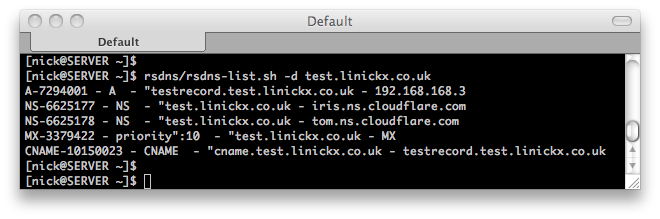
Hosted on github, rsdns is going to be a set of shell scripts of making DNS changes, now my shell scripting can be a bit n00b at times so there’s only two tools today but I’m hoping to write enough to migrate my domains to the cloud dns.
Feel free to submit recommendations, code preferably either here or on github.