Archive for October, 2007

twittering rubbish!

twittering rubbish!

No Longer Associated with Calcylator

I’ve decided to let the renewal of my domain name “calcylator.com” slip. The site was my web 2.0 idea that never got off the ground, the idea was simple, if you use ebay (as a seller) you need to calculate your costs, although ebay don’t hide fees from you the listing process doesn’t make it very obvious and if you sell a lot keeping track of your profit & loss is difficult… so I developed a site to track these and other costs (packaging etc).

I got the “beta” site up, and pestered some non-technical friends and family to try it out; I came across a fundamental problem: ebays fees are complicated, so there’s only a certain amount of simplifying you can do, general feedback was it was too much hassle… and they didn’t feel the benefit, i.e. they’d much rather just pay the fees…. isn’t funny how large companies can make a fortune by charging lots of people the odd pence here and there, and people would rather pay it than “waste” time finding a way not to pay it.

I’m quiet sad that this didn’t work, but I’m sure there’s another simpler avenue I can explore in the future, good luck to any one who decides to my old domain… well unless your one of those retailers that just buys expired domain names and then charges loads for someone genuine to use them… what I think of you couldn’t be pulished ;)

Fedora 7: Theming the Gnome Screensaver Lock Dialogue

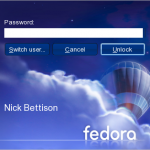
Fedora 7 Flying High Locked Theme

I stumbled across this the other day, I’ve no idea why the fedora team would go to the effort of making a really nice theme for the lock dialogue for gnome screen saver then leave it “disabled by default”. After a quick google I found the ubuntu guys have been up to something similar, so here a quick how to enable the fedora art work on the gnome-screensaver lock screen.

To enable paste this into a terminal (NOT root, as your normal user).

gconftool-2 -s --type=string /apps/gnome-screensaver/lock_dialog_theme system

To switch it back:

gconftool-2 -s --type=string /apps/gnome-screensaver/lock_dialog_theme default

The only “downer” is that your avatar isn’t shown, but for my work laptop I prefer this theme, much cooler fedora advocate when I’m not at my desk ;)

n800 Getting started (n00b) Guide… Part Two.

It’s taken me much longer to get this together than initially intended, so my apologies for that. Depending on your reasons for buying your n800 will make a difference to how much this document is relevant. What I wanted to do was concentrate on getting your n800 up and running, i.e. you’ve covered the basics, now lets install some applications to make this brick useful.

Before re-flashing my device, I always take a list of what is installed, here’s what’s on there at the moment…

becomeroot
camera,
canola
dates
devicescape
fmradio
hildon-theme-cacher
hildon-theme-plankton
maemo-serivice-handler
maemo-wordpy
maemokrypt
media center
microb-browser
openvpn
webmail notify
mplayer
navicore
openssh
oss-statusbar-cpu
pidgin
python2.5-runtime
simplelauncher
skype
videocenter

I won’t cover them all here, as we’d all fall asleep, so I’ll pick out some favourites…let’s get installing!

Multi-Media, Music ‘n’ Video to you and me.

In my opinion every n800 should have Canola installed, it’s a great multimedia app. Canola has had some dependency issues in the past, so I’d recommend you install it before anything else. To get this working disable all your repo’s except the “Nokia Catalogue” and “Nokia Catalogue 3rd Party”, then hit this canola one click install.

UK Media Player (UKMP) is another great application to install for multi media, it has a couple of dependencies. You’ll need to switch on the extras repo, install mplayer (even if you don’t want ukmp, I’d recommend installing mplayer as it’s brilliant at playing back virtually any video file) and python either by using the application manager or the one click install files.

Utilities, those little extras you might need.

Here are some extras that’ll enhance your n800 experience, you should already have the xterm install right? But some other things that might take your fancy would be the oss-statusbar-cpuit adds a nice little applet to the systray that show how “busy” your n800 is, and you can add some commands to it too!

Camera & FM radio, are two Nokia apps that enhance what you can do with the n800 hardware that aren’t loaded by default, I’m not sure why… but to make it easier for you I’ve published a copy of my sources list, if your application manager has all these catalogues installed you should see the Camera and radio as options you can install.

Since writing my first document, OpenSSH has made its way into a repo, whether you use that or dropbear is up to you, I prefer openssh as it supports the keys that I use on the rest of my linux kit.

Plankton theme is probably one of the most popular themes added to an n800, to get it working you’ll need both files plankton + hildon theme cacher… also as quick tip, always change your theme to a default Nokia one before running a backup and re-flashing your device… basically it’ll stop the restore trying to use plankton before you’ve installed it.

Web, well it is a Nokia touch, I mean internet tablet after all.

I’d recommend you install the firefox derived web browser for maemo, it’ll allow you to run “non opera supported” sites like google docs. You can switch between the opera and firefox rendering engine; to do that you need to enable the hidden menu by editing /home/user/.browser and set hidden=true (Reference).

If you have a gmail or google apps account you’ll also want the Nokia mnotify, it’ll add a little applet to you systray … personally I’d prefer it to completely disappear if you haven’t got any new mail.

If you’re into instant messaging, then you’ll need a copy of pideon. It’s installed in components so if you’re an msn or googletalk user make sure you install the correct protocol support, if all else fails install them all :)

For mobile blogging you may want maemo-wordpy, it’s not yet something I’ve taken massive advantage of as I don’t have a keyboard and you need a reasonable amount of patience or practice to write a post with the stylus, but this is something I intend to tackle!

Pim, you know contacts and calendar stuff.

There’s no right answer to this, infact I’ve still yet to find something that suites me. As a user, I prefer Dates, Contacts and tasks by pimlico, they’re built on the existing nokia “contacts” back end (evolution data server), but I’ve yet to find a way of sync’ing them with anything which makes bulk importing and general day to day usage an issue.

The alternative is the GPE suite (calendar, contacts and todo). Lots of people recommend GPE, originally I had dependency conflicts on my when I was running the 2nd version of ITOS, I’m yet to install it, but I plan to as there’s been lots of complementary projects like erming for google calendar syncing and GPE summary – a desktop applet summary of your tasks and calendar

Ok, I think we’ll finish there….
I think this post long enough, I’d like to also do a part 3 and look at the security apps you can install on your n800, this won’t be so much of a n00b guide cause it won’t appeal to most people but it’s one of the reasons the n800 caught my eye originally.

CSS Styling Apache Directory Listings.
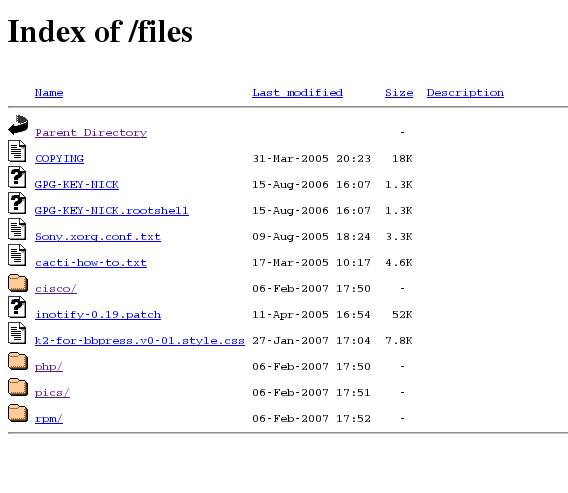
Before I change Apache
Before.

As part of my website overhaul, I’ve finally gotten round to styling my /files/ directory. I was surprised at how easy it was actually, and the benefits far out way the time taken to set it up, not only does this part of the site now “fit in”, but I can apply analytics tracking and adsense ;) I’m sure there probably is a wordpress plugin that can achieve the same thing… probably better, but I find my list of plugins ever growing and since I don’t need on for this I figure if Apache can do it, let Apache do it!

The work can be done in one of two ways either by pasting Apache directives into a .htaccess file (in the directory you want to apply conf to), or in your httpd.conf you can wrap it all up in a <Directory> tag… something like <Directory "/var/www/html/files/"> foobar </Directory>; below is an example of a .htaccess file as that will apply to most people:


RewriteEngine Off
AddType text/html .shtml
AddOutputFilter INCLUDES .shtml
Options Indexes Includes
IndexOptions FancyIndexing SuppressHTMLPreamble XHTML IconsAreLinks FoldersFirst SuppressDescription
HeaderName /files/HEADER.shtml
ReadmeName /files/README.shtml

Since my site uses wordpress with “pretty permalinks” enabled, the 1st thing I needed to do is disable mod re-write for the directory where I wanted listing enabled. Now if you check my /files/ page you’ll notice that the page title and tag line under “[LINICKX].com” change depending on what directory you are viewing, this is done with “Server Side Includes” (SSI), so the next two options in the above config set that up.

Now to take a look at the actual directory listing setup, it might be worth you taking a look at the Apache documentation for a full description, but the important ones to note are Options Indexes Includes to enable directory listing and switch on SSI, then you need IndexOptions SuppressHTMLPreamble XHTML to disable the default headers so that we can setup our style sheet and favour xHTML over HTML. Apache 2.2 users also have IndexStyleSheet available, but since I’m using CentOS4 we’ll do it this way. Finally you need the HeaderName, ReadmeName directives to tell Apache which file to look for (by default Apache looks for README.html, but that won’t support SSI)… note how my .shtml files are relative to my web root, these are not absolute paths on the file system, i.e. /files actually maps to /var/www/html/files.

You’re now good to go, HEADER.shtml should contain all the xHTML you want to appear before the directory listing, and README.html is everything after… make sure you include all the correct <html>, <body> and DOCTYPE tags.

Now you’ll want to get working is some dynamic content, for a simple “print current directory” you can use <!--#echo var="REQUEST_URI"--> in your html, further documentation on getting more magic is available here & here, I was able to knock up a simple line of code to print the current year at the bottom of the page….


<!--#config timefmt="%Y"-->
<small>Nick Bettison 2005 - <!--#echo var="DATE_LOCAL"--> &copy; </small>

Cool eh! The trick to watch out for is spaces in the above code, there should be no white space between <!--#echo or with the trailing -->.

Looking much better
After.

The final thing you’ll want to look at is those horible default icons! You have a couple of options: You can either simply replace/over-write the default ones (on my flavour of linux they are in /var/www/icons), or you can add AddIcon /icons/tar.png .tar to your htaccess file telling apache to look at tar.png rather than the default tar.gif, I found some deb archives which I extracted with file-roller (rather than trying to install anything) and simply changed the ones I was going to use…. I’m very please with the final result, I think it makes a big difference.

Happy Styling One & All!

Trouble-Shooting the WordPress Security White Paper.

I’ve been following the activity over at blogsecurity, their activities are very interesting and quite commendable. After some shameless delay I decided to read though their WP Security White Paper and apply some of the steps… yes I did say some, harden security folk will insist that you should follow all of the whitepaper to be security, which is probably true, but one should never forget that security is about risk… and in basic terms accessibility vs security, for example I won’t ever lock my wp-admin down to a single IP as I’ve been know to blog at work, home, around my parents place and even moderate comments on the train! Thus my wp-admin isn’t as secure as someone who did lock it down, but this is a risk I’m willing to live with.

One of the area’s that I did like was the tightening up of wp-includes & wp-content, but before you jump in and copy/paste what’s in the pdf into .htaccess, you should be prepared for some work. Basically


Order Allow,Deny
Deny from all
<Files ~ ".(css|jpe?g|png|gif|js)$">
Allow from all
</Files>

when applied stops any file except .css,.jpeg/jpg, .png, .gif & .js from being accessible; now this is great for stopping zero-day remote file includes from php files but it will mean that any php file (even those you may want access to) will be restricted. What I’ve decided to do below is document what changes you need to make to the recommendation to get some popular plugins to work…. This approach will also have a long term impact on the “hardening plug-in” that the blogsecurity team are planning; basically the issue is – the default recommended .htaccess will break plugins, the number of plugins avilable for a wordpress install is unlimited thus they will need to provide a community driven configuration repository that the plugin can draw upon to open things up for specific plugins.

For the purpose of this documentation, I’m going to assume wordpress is installed in /var/www/html so please change appropriately.

For those who use the rich editor and need the spell checker, you’ll need to add this to your /var/www/html/wp-includes/js/tinymce/plugins/spellchecker/.htaccess


# Open up the spellchecker
<Files "tinyspell.php">
Allow from all
</Files>

To get the popular WP-Cache plugin to work changes are made to:/var/www/html/wp-content/.htaccess

Order Allow,Deny
Deny from all
<Files ~ ".(css|jpe?g|png|gif|js|html)$">
Allow from all
</Files>

This will allow the static html files in the cache to be downloaded, now I didn’t get to the bottom of this, but I believe that the wp-cahe php files might be called directly, so if you are having problems see if this resolves it…

<Files ~ "wp-cache">
Allow from all
</Files>

This will open up the wp-cache files as if you hadn’t installed the .htaccess in the 1st place – you have been warned, now you evaluate the risk :)

If you are using the google site map generator, then you can create a .htaccess file in/var/www/html/wp-content/plugins/google-sitemap-generator to allow the xml style sheet through:

<Files "sitemap.xsl">
Allow from all
</Files>

The final one that might interest people is Share This, you’ll need at .htaccess in /var/www/html/wp-content/plugins/share-this with:

<Files "share-this.php">
Allow from all
</Files>

As you might have gathered this does involve creating a lot of .htaccess files, which is a bit of a pain, if you’re fortunate enough to run your own web server and have access to your httpd.conf you can actually keep these all in one file, keeping with the last share this example, instead of creating a .htaccess in /var/www/html/wp-content/plugins/share-this you can edit your httpd.conf and just wrap the code in <Directory>, so you could actually paste this:
<Directory "/var/www/html/wp-content/plugins/share-this/">

<Files "share-this.php">
Allow from all
</Files>
</Directory>

I hope this all makes sense, and is of some use to someone…good luck to the blogsecurity team, if you need any help feel free to shout ;)

Firefox 3, Secure Updating

I saw this digg article the other day and it lead me to something interesting. …

All Firefox add-ons must now use a secure method for auto-updating (see bug 378216 and this guide for more details)

Reference: Mozilla Gran Paradiso Alpha 8 Release Notes

In general this is a good thing, and I’m 100% behind any security improvements the mozilla team make….I just hope they make this amenable to the newbies, I recently had a go at writing a small “status bar” firefox addon, and the 1st thing I spotted when installing it was that it was “unsigned”… I looked into the documentation and found it very confusing, and when I finally got it to work I ran into the age old issue that I didn’t have a certificate that was signed by a main stream CA, as such I would need to distribute that as well.

I’m going to put looking at the new “secure update” solution on my todo list in hope that I can get some real insight into what they are planning, fingers crossed its good, it works and makes a real difference to the firefox community at large.

links for 2007-10-01