Posts Tagged ‘how to’

Cisco VPN 3k Config for iPhone

Recently I was asked if I could help setup a VPN connection between an Apple iPhone and a Cisco VPN Concentrator 3000, my 1st round of googling didn’t look good, there’s a discussion here complaining about how crap vpn support on the iphone is; further searching lead me to a Cisco document which specifically targets mac clients, this document is for ASA configuration, but if you look carefully* everything you need is in there.

*No, I didn’t get this working 1st time, it took me a good couple of hours of googling, but looking back I can see that all the info is there.

How to Import Vendor Specific Attributes into Cisco Secure ACS SE Applience

I wanted to write a document on how to import RADIUS VSA’s (vendor specific attributes) into cisco’s ACS SE (Solution Engine) appliance, the reason being that I couldn’t find any good examples on the net and cisco’s documentation just wasn’t clear enough.

My purpose was to use RADIUS authentication between a Nokia IPSO appliance such that users who access voyager or ssh get authenticated centrally; for RADIUS authentication to work your authentication server (in this case ACS) needs to supply the AAA client (in this can the ipso box) with a “return list attribute”. By default ACS doesn’t have the nokia attributes; to import attributes you need to get your hands on a dictionary file, for nokia ipso it’s /etc/nokia.dictionary - I’ve a copy here.

n800 Getting started (n00b) Guide… Part Two.

It’s taken me much longer to get this together than initially intended, so my apologies for that. Depending on your reasons for buying your n800 will make a difference to how much this document is relevant. What I wanted to do was concentrate on getting your n800 up and running, i.e. you’ve covered the basics, now lets install some applications to make this brick useful.

Before re-flashing my device, I always take a list of what is installed, here’s what’s on there at the moment…

becomeroot
camera,
canola
dates
devicescape
fmradio
hildon-theme-cacher
hildon-theme-plankton
maemo-serivice-handler
maemo-wordpy
maemokrypt
media center
microb-browser
openvpn
webmail notify
mplayer
navicore
openssh
oss-statusbar-cpu
pidgin
python2.5-runtime
simplelauncher
skype
videocenter

I won’t cover them all here, as we’d all fall asleep, so I’ll pick out some favourites…let’s get installing!

CSS Styling Apache Directory Listings.

Before I change Apache
Before.

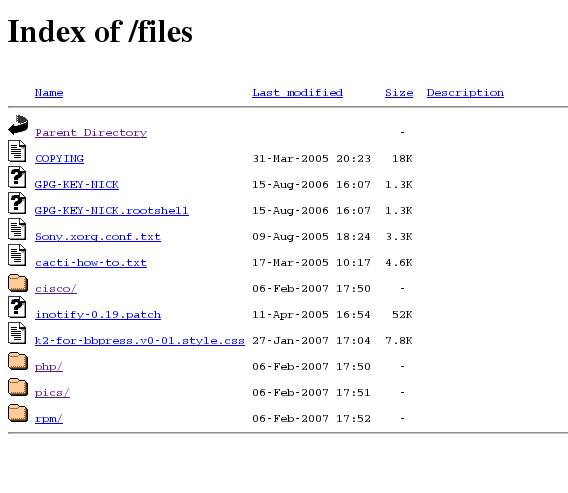
As part of my website overhaul, I’ve finally gotten round to styling my /files/ directory. I was surprised at how easy it was actually, and the benefits far out way the time taken to set it up, not only does this part of the site now “fit in”, but I can apply analytics tracking and adsense ;) I’m sure there probably is a wordpress plugin that can achieve the same thing… probably better, but I find my list of plugins ever growing and since I don’t need on for this I figure if Apache can do it, let Apache do it!

USB Networking with Fedora 7 & n800

There are times where you cannot use WiFi, for example my workplace’s WLAN uses LEAP, which maemo doesn’t support. I found that setting up USB networking on my n800 was a bit of a pain since there isn’t a single document… if you check my del.icio.us feed you’ll see I bookmarked all I could find with a usbnet tag.

These are the steps I ran through to enable usb networking between my nokia n800 and my fedora 7 laptop.

n800 Getting started (n00b) Guide… Part One.

I’ve had my n800 a little over two weeks, and the length of this post will propably explain why I haven’t posted about it before. I love the box, it looks sooo good, and the linux inside means that the scope of potential is just unimaginable… but… the experience isn’t perfect. I guess the experiece is very much like the windows / linux thing as a whole, what works is great, but sometimes getting linux “just so” can be more of an effort than in windows.

A Linux / Command line: how to upload to wordpress wp-plugins.org via subversion ( SVN )

Could that title get any longer !

Hopefully you get the point, sometimes you need different tools for different jobs, if you want a full development platform with SVN support I suggest you take a look at eclipse (with subclipse ) but what if you already have done the development and you just want to do a quick upload.

My phpbb_recent_topics plugin is hosted here, and when the nice guys at wordpress gave me an svn account, I just wanted a quick way to upload what I’ve done. Now I must stress this may not be the “proper” way to use svn (there’s a book for that) but it is enough to achieve what we want, a straight forward upload.

How to Migrate from White Box Linux 4 to CentOS 4.4

There are somethings that you just never get round to, my nagios box was still running whitebox linux, and I’ve finally gotten round “upgrading” it to CentOS… yeah ok, upgrade is arguable, but you get my point.

First off a warning: Don’t do this ! All the documentation, for CentOS, RHEL, Fedora, any redhat linux all say, clean installs are the best way, and upgrades are not advised…. therefore I offer no support or warranty that this will work, in fact, I you advise you to read this post, but step away from your consoles !

How to Monitor wordpress with Nagios

Wordpress like many web applications relies on apache (or something else) to serve the HTTP pages and mysql to store the data. Your wordpress website is important to you, so you need an external monitoring system to let you know what’s going on.

Nagios is a great, enterprise class, open-source monitoring application; and what you need do is configure it to exactly represent how wordpress works; if you can get that right you can immediately get notified if any piece of the puzzle fails.

Cacti & Nagios - Missing Favicons

Recently I decided to re-organise my bookmarks toolbar, and added links to my nagios and cacti installations. I noticed that the favicons where missing.

For cacti, there’s a how to, but I found it a little over kill - I didn’t need step 2 , as my catci install is an rpm from dag, and I didn’t bother with step 4, as it worked without it, but hey ymmv!

Nagios was simpler, depending on how you installed nagios, will effect file permission , owners, directories etc. Again, I’ve got another dag rpm, so for me I logged in as root,

Basic Example Cisco Switch Config

666
Figure 1

I’ve been meaning to add a dedicated cisco section to my site for a while, I thought it’d be helpful if I converged my rants with work a little ;) I’m hoping to build up a personal archive of notes for work, and in doing so help other with similar roles & problems. I’ve gone through and added any cisco related posts to my archive , useful cisco bookmarks have always been online with del.icio.us , and now to finish off I have a config files directory. Usual rules apply to this an all other posts - see disclaimer.

How to Exploit MS06-040

It would have been irresponsible of me to write this any earlier, but a few days of past and hopefully the majority have installed the appropiate patch or at the very least are running personal/perimeter firewalls until they complete their change control.

Many may have seen e-mail alerts and news articles that say exploit in the wild and may not appreciate what this actually means. You hear people say “It’ll never happen to me” or “it’s only geeky Linux kids who can do this, my business isn’t at risk”; OK but do you know actually how easy it is ?

How to Get Google Browser Sync outside the USA

Some people may have noticed that you can’t install Google Browser Sync for Firefox if you live outside of the USA. If you try and download the xpi package directly you get this page This product is not available in your country :-(

Well I’ve got a neat trick, try this link instead: http://anon.free.anonymizer.com/http://toolbar.google.com/firefox/extensions/toolbar/google-browsersync.xpi

Cacti. How to Enable SNMP v3 Polling.

Cacti SNMP v3 How-To (0.2)

Preface:

This document is intended to describe the process required to enable encrypted snmp polling within cacti. The document was written whilst performing the installation on a Linux Fedora Core 3 server, although implemntations on Fedora Core 1 & White Box Enterprise Linux have also been sucesful. The host used to gather data from for the purpose of this document is a Nokia IPSO appliance.

Limitations:

The version of cacti used will be 0.8.6b, “TheWitness” has told me that this version has a pooler crash, but I’ve yet to try upgrading to 8.8.6c.

Cacti SNMP v3 “how to” (1st Draft)

It’s taken a lot longer than it should have done, but my 1st draft is finally done !

I guess this is the first really test of my site, some real content !

Anywho you can check it how here: Cacti: SNMP v3 “how to”

rgds [NICK]