Archive for May, 2009

McAfee Technical Professional in Network Security

McAfee Technical Professional in Network Security

Watching mind-numbing McAfee T…

Watching mind-numbing McAfee Training VoDs … Feels like a waste of a sunny Friday afternoon.

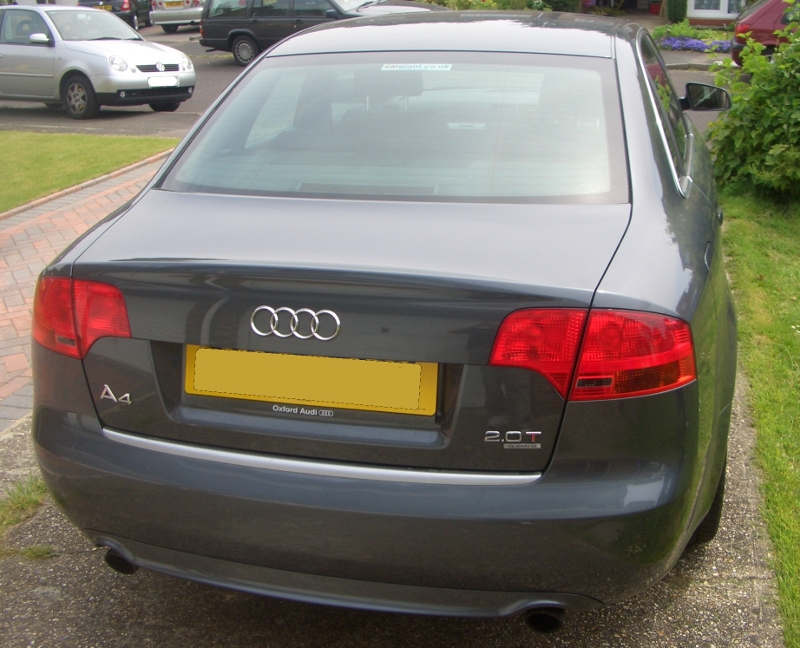
My A4 Tech Specs

Thanks to QuattroJames for answering my question.

0 – 60 = 6.7secs
216 Bhp
Top speed = 152Mph

Yummmm… and 31 miles per gallon is something to aim for ;)

Reference: Parkers

Simply doesn’t get Bluecoats C…

Simply doesn’t get Bluecoats Content Policy Language! … Will do more RTFM!

…and from the side.

I managed to get a copy of the sales photos before they de-listed my car from their website, here’s the side view for those who asked. A4 Sales Photo (Side View)

Wants to go out for a Drive!

Wants to go out for a Drive!

The Quattro has Arrived!

Irritating ASDM & Java issues…

Follow up from this tweet. Every time I tried to connect to the ASA’s ASDM Java would crash with a Null Pointer exception, I tried everything from deleting the .asdm folder in my home directory (my documents on windows), uninstalling the asdm launcher didn’t help, neither did clearing java’s cache or uninstalling and re-installing java.

In the end i had to downgrade, very frustrating!

Having issues with Java and AS…

Having issues with Java and ASDM!!!

Shrinking Word Docs with CTRL+…

Shrinking Word Docs with CTRL+A , CTRL+SHIFT+F9 !

18th May

 
Tags:
Comments Off

Linux : Fedora 11 Screenshot Tour.

Fedora 11 Screenshot Tour. Screen shots of install and other items.

IPSO: From CLISH to Bourne Shell (sh)

Note to Self:

If an administrator has setup your Nokia (IPSO) shell account to log into clish rather than the unix shell… and you need to cpstop;cpstart… you can switch shells with the command…

Nokia:>shell
[admin@nokia]#

It’s quite a simple command, so why can’t I remember it!

Footnote:
iclid is the “router shell” – where you can do show commands
clish is the “voager shell” – where you can “set” things and make changes
/bin/sh or Bourne shell (or sh) is the “Unix shell” – where you have access to the root operating system and can make changes to the file-system or restart processes.

Building up to the big drive $…

Building up to the big drive $HOME!!

root-cookie – Tutorial 1: Accessing WordPress cookies from custom scripts.

I’ve been wanting to do this for a while, this is the 1st in a planned short series of tutorials for my root cookie WordPress plugin.

I’ve decided to start with the purpose I wrote the plugin, then I’ll move onto a couple of tutorial which answer some of the FAQs I get.

Scenario.
Before you start you need a working copy BLANK of WordPress, in a sub directory, with a url like domain.com/wordpress.
A BLANK copy is a fresh install, using the default theme and only my root-cookie plugin installed, remember after activating the plugin clear your browsers cookies.

Getting Started.
So you have a ready & waiting copy of WP, next create a directory called “my-scripts” or whatever you like, and in it create 1.php with the following contents:


<?php
print_r($_COOKIE);
?>

Browse to domain.com/my-scripts/1.php and you’ll get a blank white page with Array().
Next log into WordPress, and re-fresh 1.php and you should get something like….

Array ( [wordpress_xxxxxxxxxxxxxyyyyyyyyyyyyyy] => admin|1241455565|xxxxxxxxxxxxxyyyyyyyyyyyyyy [wordpress_logged_in_xxxxxxxxxxxxxyyyyyyyyyyyyyy] => admin|1241455565|xxxxxxxxxxxxxyyyyyyyyyyyyyy )

Done! You’ve just accessed WordPress’s cookies :)

Now when I first started I had a very basic script which hid my Google adverts when I’m logged in, it’s against Google’s policies to click on your own adverts so to avoid accidents I wanted to hide them.

The following script is NOT secure, it doesn’t check that you’ve logged into WordPress it simply checks that you a cookie set with the right username (which anyone can fake) but for my purpose this was fine, I had no issues with users faking cookies to get rid of the adverts*


<?php
if (isset($_COOKIE["wordpress_logged_in_fxxxxxxxxxxxxxyyyyyyyyyyyyyy"])) {
$cookie = $_COOKIE["wordpress_logged_in_xxxxxxxxxxxxxyyyyyyyyyyyyyy"];
$cookie_elements = explode('|', $cookie);
if ($cookie_elements[0] == "admin") {
echo "<h1>Hello admin!< </h1>";
}
}
?>

Replace admin with whatever username your using and job done! Next time Accessing two WordPress installs domain.com/blog1 domain.com/blog2 with root-cookie :)

*this will not work now, as I do something different. :)

links for 2009-05-06