
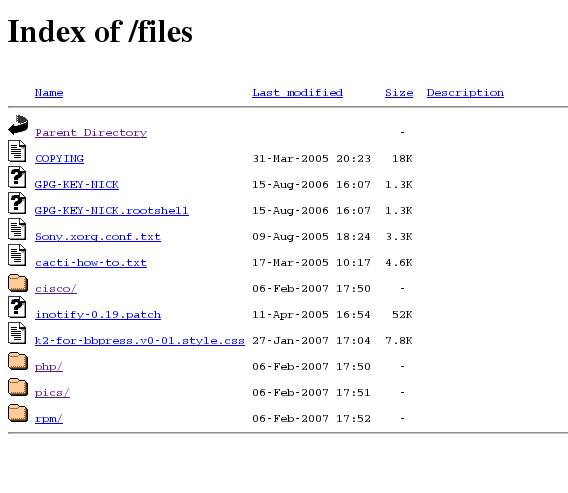
|
| **Before.** |
As part of my website overhaul, I've finally gotten round to styling my /files/ directory. I was surprised at how easy it was actually, and the benefits far out way the time taken to set it up, not only does this part of the site now "fit in", but I can apply analytics tracking and adsense ;) I'm sure there probably is a wordpress plugin that can achieve the same thing... probably better, but I find my list of plugins ever growing and since I don't need on for this I figure if Apache can do it, let Apache do it!
The work can be done in one of two ways either by pasting Apache directives into a .htaccess file (in the directory you want to apply conf to), or in your httpd.conf you can wrap it all up in a
<Directory>
tag... something like
<Directory "/var/www/html/files/"> foobar> </Directory>
below is an example of a .htaccess file as that will apply to most people:
        RewriteEngine Off
        AddType text/html .shtml
        AddOutputFilter INCLUDES .shtml
        Options Indexes Includes
        IndexOptions FancyIndexing SuppressHTMLPreamble XHTML IconsAreLinks FoldersFirst SuppressDescription
        HeaderName /files/HEADER.shtml
        ReadmeName /files/README.shtml
Since my site uses wordpress with "pretty permalinks" enabled, the 1st thing I needed to do is disable mod re-write for the directory where I wanted listing enabled. Now if you check my /files/ page you'll notice that the page title and tag line under "[LINICKX].com" change depending on what directory you are viewing, this is done with "Server Side Includes" (SSI), so the next two options in the above config set that up.
Now to take a look at the actual directory listing setup, it might be worth you taking a look at the Apache documentation for a full description, but the important ones to note are
Options Indexes Includes
to enable directory listing and switch on SSI, then you need
IndexOptions SuppressHTMLPreamble XHTML
to disable the default headers so that we can setup our style sheet and favour xHTML over HTML. Apache 2.2 users also have IndexStyleSheet available, but since I'm using CentOS4 we'll do it this way. Finally you need the HeaderName, ReadmeName directives to tell Apache which file to look for (by default Apache looks for README.html, but that won't support SSI)... note how my .shtml files are relative to my web root, these are not absolute paths on the file system, i.e. /files actually maps to /var/www/html/files.
You're now good to go, HEADER.shtml should contain all the xHTML you want to appear before the directory listing, and README.html is everything after... make sure you include all the correct \<html>, \<body> and DOCTYPE tags.
Now you'll want to get working is some dynamic content, for a simple "print current directory" you can use
<!--#echo var="REQUEST_URI"-->
in your html, further documentation on getting more magic is available here & here, I was able to knock up a simple line of code to print the current year at the bottom of the page....
<!--#config timefmt="%Y"-->
<small>Nick Bettison 2005 - <!--#echo var="DATE_LOCAL"--> &copy; </small>;
Cool eh! The trick to watch out for is spaces in the above code, there should be no white space between
<--#echo
or the trailing
-->
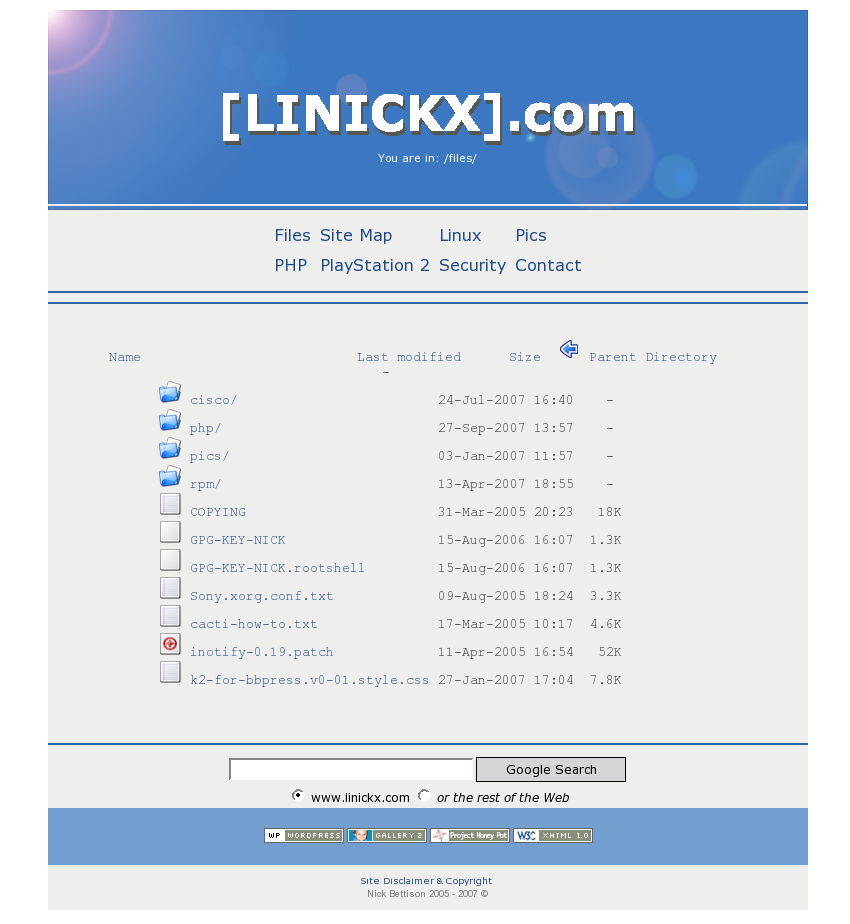
|
| **After.** |
The final thing you'll want to look at is those horible default icons! You have a couple of options: You can either simply replace/over-write the default ones (on my flavour of linux they are in /var/www/icons), or you can add
AddIcon /icons/tar.png .tar
to your htaccess file telling apache to look at tar.png rather than the default tar.gif, I found some deb archives which I extracted with file-roller (rather than trying to install anything) and simply changed the ones I was going to use.... I'm very please with the final result, I think it makes a big difference.
Happy Styling One & All!