
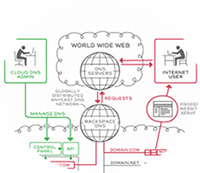
As a cloud
server
customer you get access to rackspace's free DNS
service.
When I fist saw this product I had an instance light-bulb moment, I could stop paying for a dynamic DNS service and build my own private one. As a broadband (DHCP) user I have a very basic requirement of needing to regularly update an A record so that I can find my pc :)
To bring my idea into fruition I began researching; I need a cli tool which I could run from cron on my linux box (to send the DNS update requests to rackspace). In my research I found rscurl, a cli tool to control cloud servers, as rackspace have a standard API for all their products I have been able to use rscurl to develop rsdns.
rsdns is a series of cli tools to adding/deleting/changing rackspace DNS
records, as part of the tool development I have created a script called
rsdns-dc.sh to run on my machine, below is a short how to:
How to get free dynamic dns from rackspace.
Pre-requisit: This is for linux/mac, if you want to do this on windows you'll need bash, curl, awk, sed & dig installed - google is your friend.
The instructions below assume that you (a) have a domain and (b) have already changed your NS records to point to dns1.stabletransit.com & dns2.stabletransit.com.
Download the latest rsdns from
gitgub and unpack
somewhere, I like ~/bin/rsdns.
Go to your rackspace management portal and grap your username & API key (It's under "Your Account" -> "API Access")
Create a config file for rsdns (~/.rsdns_config) with your settings.
#!/bin/bash
RSUSER=linickx
RSAPIKEY=123456
RSPATH=~/bin/rsdns/
You need your domain created on rackspace, you can either use rackspaces GUI to do this (It's under "Hosting" -> "Cloud Servers" -> "serverabc" -> "DNS" ) or you can use rsdns, like so.
#!/bin/bash
[LINICKX@SERVER rsdns]$./rsdns-domain.sh -d www.linickx.com -e [email protected]
Once you have a domain setup you need an A record, this step was a deliberate design to avoid any rouge cron jobs from creating a million records, the dynamic client will only update an existing record - not create a new one.
To create the a record you going to need an IP address, it can be something random like the below, or you can use http://icanhazip.com to get your actual current IP. Again to create a record, you can use the rackspace GUI (It's under "Hosting" -> "Cloud Servers" -> "serverabc" -> "DNS" -> "yourdomain" > "Add") or you can use rsdns....
#!/bin/bash
[LINICKX@SERVER rsdns]$./rsdns-a.sh -n dynamichost.linickx.com -i 123.123.123.123 -t 3600
In the above the TTL is set to 1hr, this is so that DNS caches do not keep the record too long. That's all the pre-work done, now lets get your dynamic host setup!
The script to update your a record is rsdns-dc.sh, and you run it like
this...
#!/bin/bash
[LINICKX@SERVER rsdns]$./rsdns-dc.sh -n dynamichost.linickx.com
Easy huh? The script uses icanhazip to get your current IP, it then update the A record with it.
I never switch off my router so I have create a created a cronjob to run that script every 2 hours, plus the 1hr TTL should mean that the record is roughly in sync with my IP without making unnecessary requests - You can run the script more often if you like, just stay under the limits --> according to the API guidelines you can make upto 25 changes per min / 2 per second.
I use redhat based linux systems, so I can simply drop the following
file called rsdns-dc into /etc/cron.d/ with this...
* */2 * * * linickx /home/linickx/bin/rsdns/rsdns-dc.sh -n dynamichost.linickx.com &>/dev/null
Now we are actually done! Free private Dynamic DNS on your own zone, what more could you want?