Posts Tagged ‘root-cookie’
Submit Bugs to TRAC
Support for linickx plugins has always been community driven, but recently I’ve had a few bugs and patches submitted via email.
To make like simpler I’ve found that I can track bugs using trac – bad pun!
Here are some links
- PHPBB Recent Topics
- Root Cookie
The difference between the two is simple: if you want help then click the support link if you want TO help then file a bug or submit a patch
Follow plug-in development progress
The WordPress plugin trac is a really cool resource, one of my favourite features is the commit log.
Development progress of linickx plugins is always going to be slow because I have a day job but when I find the time to develop updates I try to commit them to the community as often as I can so users can stay in the loop…. The thing is users don’t necessarily know the log is there, so here’s a couple of links for you…
If you want test drive my development versions on your blog you can download them from wordpress.org here and here respectively, feel free to submit patches to fix bugs or implement features, I’m always open to suggestions and work is always accredited appropriately.
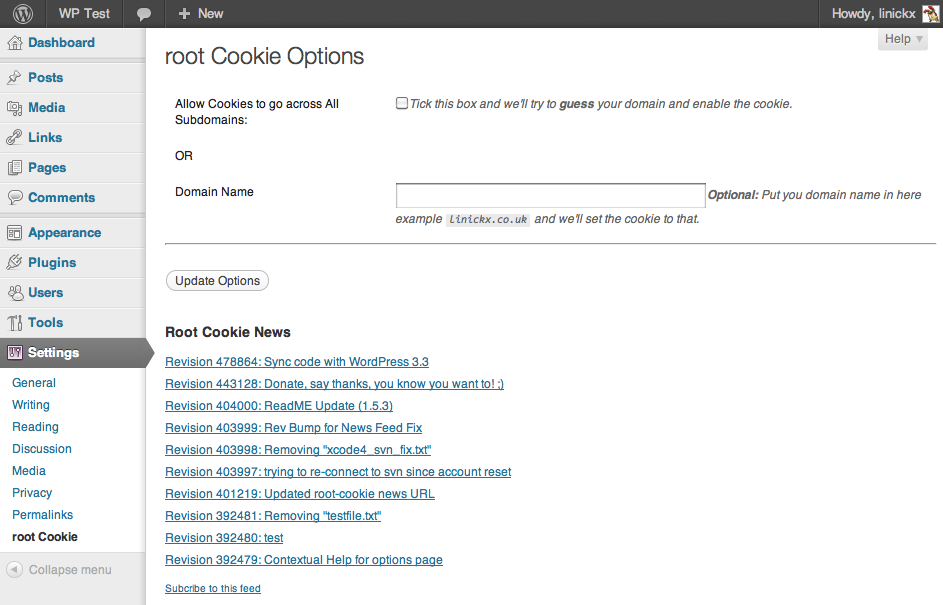
Introducing root cookie 1.5 now with subdomain support!
A long time ago Sc0ttClark came to me and suggested that his cookie subdomains plug-in & my cookie path plug-in should be merged…. well I’ve finally done it!
There was a little delay in the release as the initial code only worked for top level .com, .net & .org style domains but a simple “manual” option in the admin screen now allows you to set the domain name, so longer domains like .co.uk can be supported!
All previous functionality is supported, just by enabling the plug-in the path is stripped out you only need to go into the admin page if you want to change the subdomain of the cookie.
The admin page now has a “News & Tutorials” feed (subscribe) my plan is to post articles on how to use root-cookie.
You can download the plugin from wordpress.org, and there is a discussion forum to get community support.
Using root-cookie for unified WordPress Log-ins
I’ve just found this great tutorial on my referrers: Single unified login for multiple WordPress 2.8 installs in subdirectories using cookies
I’d suggest reading it if you’re a root cookie user
root-cookie – Tutorial 1: Accessing WordPress cookies from custom scripts.
I’ve been wanting to do this for a while, this is the 1st in a planned short series of tutorials for my root cookie WordPress plugin.
I’ve decided to start with the purpose I wrote the plugin, then I’ll move onto a couple of tutorial which answer some of the FAQs I get.
Scenario.
Before you start you need a working copy BLANK of WordPress, in a sub directory, with a url like domain.com/wordpress.
A BLANK copy is a fresh install, using the default theme and only my root-cookie plugin installed, remember after activating the plugin clear your browsers cookies.
Getting Started.
So you have a ready & waiting copy of WP, next create a directory called “my-scripts” or whatever you like, and in it create 1.php with the following contents:
<?php
print_r($_COOKIE);
?>
Browse to domain.com/my-scripts/1.php and you’ll get a blank white page with Array().
Next log into WordPress, and re-fresh 1.php and you should get something like….
Array ( [wordpress_xxxxxxxxxxxxxyyyyyyyyyyyyyy] => admin|1241455565|xxxxxxxxxxxxxyyyyyyyyyyyyyy [wordpress_logged_in_xxxxxxxxxxxxxyyyyyyyyyyyyyy] => admin|1241455565|xxxxxxxxxxxxxyyyyyyyyyyyyyy )
Done! You’ve just accessed WordPress’s cookies
Now when I first started I had a very basic script which hid my Google adverts when I’m logged in, it’s against Google’s policies to click on your own adverts so to avoid accidents I wanted to hide them.
The following script is NOT secure, it doesn’t check that you’ve logged into WordPress it simply checks that you a cookie set with the right username (which anyone can fake) but for my purpose this was fine, I had no issues with users faking cookies to get rid of the adverts*
<?php
if (isset($_COOKIE["wordpress_logged_in_fxxxxxxxxxxxxxyyyyyyyyyyyyyy"])) {
$cookie = $_COOKIE["wordpress_logged_in_xxxxxxxxxxxxxyyyyyyyyyyyyyy"];
$cookie_elements = explode('|', $cookie);
if ($cookie_elements[0] == "admin") {
echo "<h1>Hello admin!< </h1>";
}
}
?>
Replace admin with whatever username your using and job done! Next time Accessing two WordPress installs domain.com/blog1 domain.com/blog2 with root-cookie
*this will not work now, as I do something different.
root Cookie Path 1.4 an Update for WordPress 2.7
UPDATE: This Plugin has been updated, please comment on the new post, thanks.
I’ve had an e-mail from Edward Laverick saying that my WordPress root Cookie plugin doesn’t work in WP2.7.
I have a few points to make….
- Not All Cookies are plug-able.
A google search of the WordPress SVN show’s that there are setcookie actions outside of the avilable pluggable functions; the only way to change these that I know of is to hack the trunk code. - Changes to 1.4.
This new version does work in 2.7… I’ve refined the code in two ways, the plug-able functions are inline with WP2.7 (i.e. any changes in the trunk have been duplicated in this plug-in) and got rid of the bug where the same cookie isn’t set twice.
I’ve tested this plug-in on my server and ensured that we are changing the cookie path on both the “admin cookie” and the “logged in cookie” so hopefully all will work as expected. - Do you really want this plugin ?
Scott Kingsley Clark has created a sub-domains version of this plugin it’s worth a look if you’re working with blog1.domain.com and blog2.domain.com
As always….
The point of the plugin is to strip out the path from the cookie so that it can be referenced by other applications.
You can download the plugin from wordpress.org, and there is a discussion forum to get community support.
Cheers!
Root Cookie for WP 2.6
UPDATE: This Plugin has been updated, please comment on the new post, thanks.
Thanks to Scott Kingsley Clark for giving me the kick I needed, but I’ve finally gotten around to updating my root Cookie plugin for WordPress, we’re now at Version 1.3 !!
The point of the plugin is to strip out the path from the cookie so that it can be referenced by other applications; wordpress 2.6 has a whole new cookie structure and this broke the old version, but I’ve been so swamped recently that it wasn’t maintained.
Scott is one of the very few nice people in the world who instead of grumbling offered up a patched plugin, actually I’ve done it a different way but I appreciate his support anyway.
You can download the plugin from wordpress.org, and there is a discussion forum to get community support.
Enjoy!